Schema markup for AI search: what it does and what it does not
Schema for AI search means adding structured data, a short piece of code that names the facts on a page, so search engines and the AI tools built on them can read who you are and what you offer without guessing. It helps machines understand a page. It is not a ticket into AI answers. Google says its AI features need no special schema, and Bing says structured data may support clearer grounding but does not guarantee visibility.
Think of schema as the label on a moving box. A good label tells the movers what is inside and which room it goes to. It does not make the box worth moving, and a label that lies about what is inside causes more trouble than no label at all.
Markup is a small slice of making a site clear to AI tools. Crawler access, page structure and the answers themselves carry more weight, and all of it sits inside our generative engine optimization services.
What is schema markup?
Schema markup is code that describes a page using a shared vocabulary that search engines understand. The vocabulary lives at schema.org. The code is usually written in JSON-LD, a format that sits in its own script tag, apart from the text people read. Google recommends JSON-LD for most sites because it is the easiest format to set up and maintain.
The three terms get mixed up, so here is how they fit together:
- Structured data
Structured data is the general idea: information in a fixed format that a machine can read.
- Schema.org
Schema.org is the vocabulary: agreed names for things like Organization, Product, Article and Person.
- Schema markup
Schema markup is what goes on your page: structured data written with that vocabulary.
Google calls structured data a standardized format for providing information about a page and classifying its content. It says it uses the structured data it finds to understand pages and to learn about the people, books and companies they describe.
How do AI search tools use structured data?
Each company says something different, and some say nothing at all. Here is what their own documentation says:
- Google Search, including AI Overviews and AI Mode.
Google’s guide to its generative AI features says structured data isn’t required for generative AI search and there is no special schema.org markup to add. The same guide says to keep using structured data as part of your SEO, because it helps pages qualify for rich results. Google’s list of SEO basics for AI features includes checking that your markup agrees with the text people can see.
- Microsoft Bing and Copilot.
Bing’s Webmaster Guidelines say structured data may support clearer grounding but does not guarantee visibility or grounding traffic, and that markup must accurately reflect visible content. Grounding is the step where an AI tool pulls in web pages to base its answer on. A Microsoft Advertising post on AI search answers from October 2025 describes schema as code that helps search engines and AI systems understand your content.
- ChatGPT.
OpenAI’s crawler documentation explains how to allow or block its bots in robots.txt and does not mention structured data. For shopping, OpenAI documents a separate product feed that stores submit for discovery in ChatGPT. That is a data file sent to OpenAI, not markup on your pages.
- Perplexity and Claude.
Their crawler documentation covers robots.txt and says nothing about structured data either way.
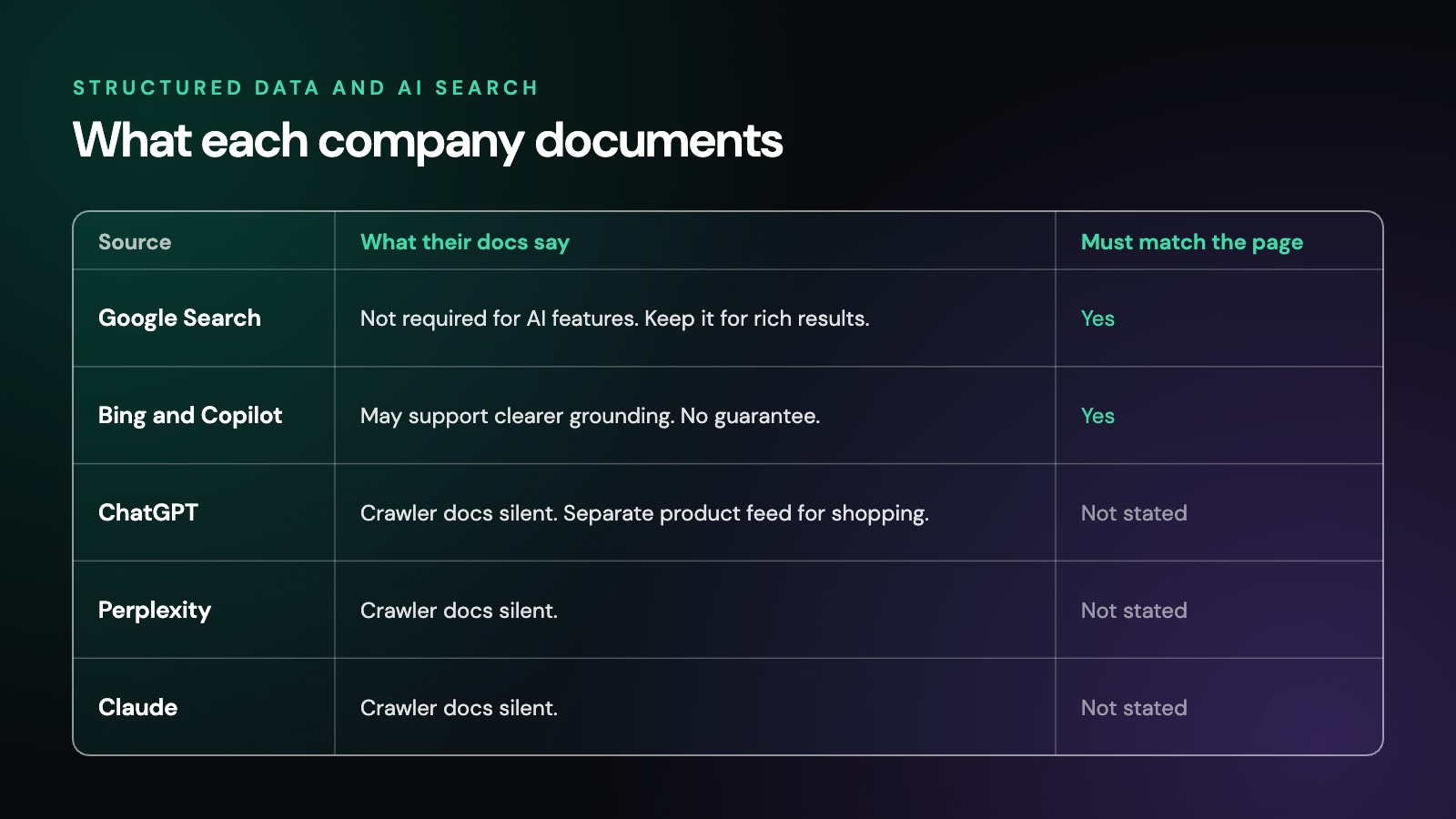
The fair reading: Google and Bing both read structured data, and both say it must match the page. Neither promises that it earns a citation. The other AI companies have not said. Silence is not a no, but it is not a yes either.
What else each tool documents is covered in our guides to how to rank in AI Overviews and how to rank in ChatGPT.
Does structured data for AI search improve citations?
No AI search company has published evidence that adding schema gets a site cited more often. Google says it isn’t required. Bing says it does not guarantee visibility. Anyone who calls schema a confirmed AI ranking factor is ahead of the evidence.
That does not make it pointless. Schema still earns its place for three reasons:
- It removes guesswork.
Your business name, address, services, authors and dates, stated in a fixed format, are harder to misread than the same facts scattered across a page.
- It ties your identity together.
Google says Organization markup on your home page can help it understand your administrative details and tell your organization apart from others in search results. The sameAs property, which lists your profiles on other sites, is part of how that works.
- It still powers features in regular search.
Product, review, event, local business and other types can make a page eligible for richer results in Google, and Google’s AI features are rooted in the same core ranking and quality systems.
So treat schema as a clarity tool that supports good pages. It will not rescue a weak one.
Which schema types matter most for AI search?
Start with the types that describe the facts people ask AI tools about most: who you are, what you sell, who wrote the page and what it covers. For most business websites that means:
- Organization, on the home page.
Your legal name, logo, contact details and sameAs links to the profiles you actually control. Google recommends placing it on your home page or on one page that describes your organization.
- LocalBusiness, if you serve customers in person.
Your address, hours and phone number, using a schema.org subtype that fits, such as Dentist or Plumber. If you have more than one location, give each one its own page and its own markup, and list an address only where a real office exists.
- Service, on service pages.
What the service is, who provides it and the area it covers.
- Article and Person, on guides and posts.
The headline, dates and author, with the author linked to a real bio page. Keep the published and updated dates in the code the same as the dates readers see.
- Product, on product pages.
Name, price, availability and reviews, kept the same as the page and any product feed you send out.
- BreadcrumbList.
Where the page sits on your site. Most SEO plugins add this already, so check before you add a second copy.
- FAQPage, only where a real FAQ is on the page.
More on that below.
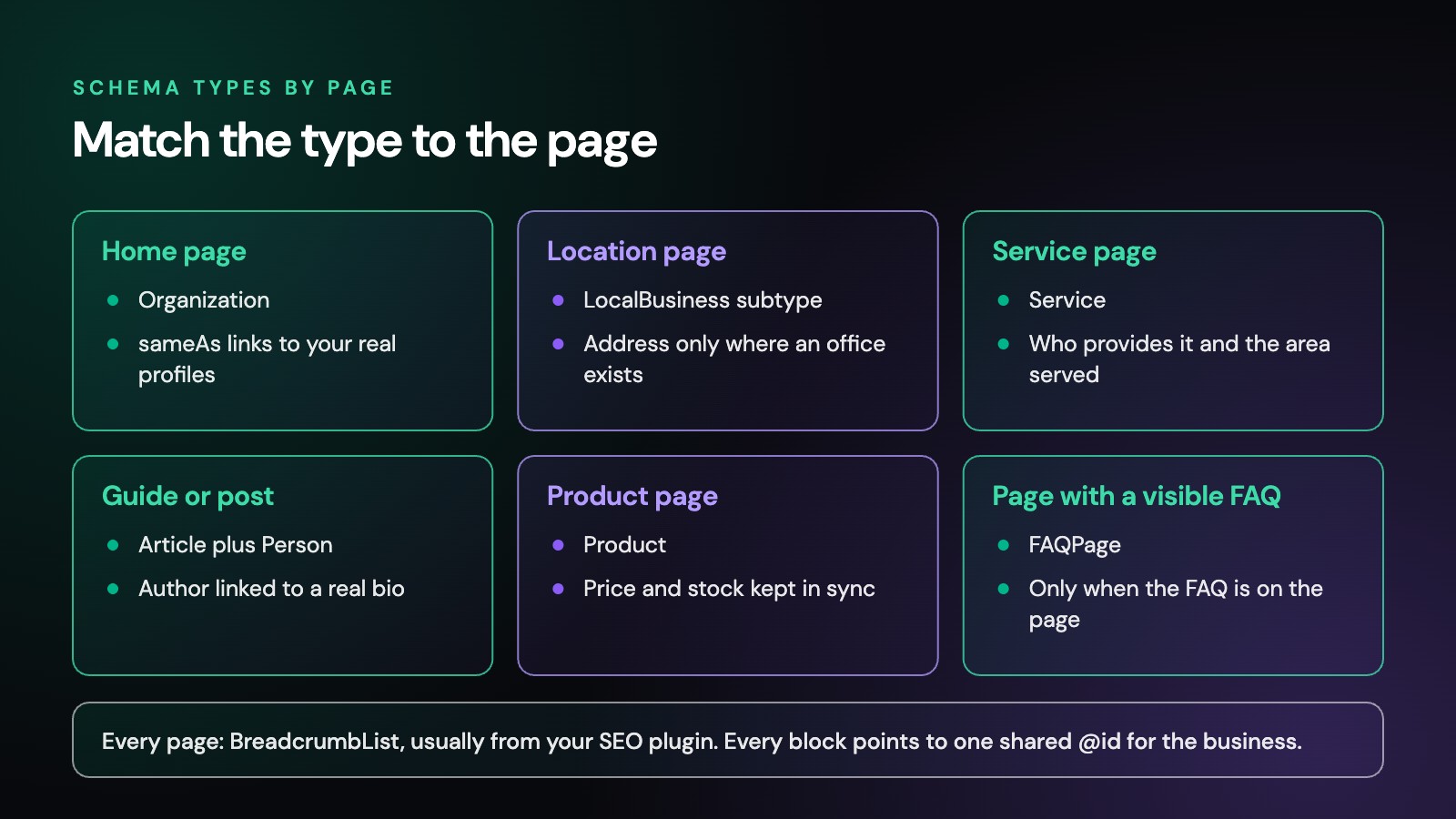
Google’s advice is that a few complete and accurate properties beat a long list of half-filled or badly formed ones. Pick the types that describe what is really on each page, and fill them in well.
What happened to FAQ and HowTo rich results?
They are gone from Google Search. Google stopped showing HowTo rich results in September 2023. FAQ rich results were cut back to well-known government and health sites in August 2023, and Google’s documentation changelog says the FAQ rich result no longer appears in Google Search starting May 7, 2026. Google removed the FAQ rich result documentation in June 2026.
In June 2025 Google also began phasing out seven lesser-used structured data features in Search: Book Actions, Course Info, Claim Review, Estimated Salary, Learning Video, Special Announcement and Vehicle Listing. Google said the change would not affect how pages rank, and that use of those types outside Google Search is not affected.
Does that mean you should delete your FAQPage markup? Not necessarily. When Google cut back FAQ results in 2023, it said structured data that is not being used does not cause problems for Search. FAQ markup on a real, visible FAQ still states your questions and answers in a form other search engines and tools can read, and Microsoft’s post lists FAQ among the kinds of content schema can label. Just stop expecting it to change how your Google listing looks, and never add it to a page that has no visible FAQ.
What does schema markup look like on a business website?
Here is a short example for a made-up service business. Every name, number and address in it is invented.
{
  "@context": "https://schema.org",
  "@type": "Plumber",
  "@id": "https://example.com/#organization",
  "name": "Example Plumbing Co.",
  "url": "https://example.com/",
  "logo": "https://example.com/logo.png",
  "telephone": "+1-555-010-0100",
  "address": {
    "@type": "PostalAddress",
    "streetAddress": "100 Main Street",
    "addressLocality": "Exampletown",
    "postalCode": "00000",
    "addressCountry": "US"
  },
  "openingHours": "Mo-Fr 08:00-17:00",
  "sameAs": ["https://profiles.example.net/example-plumbing"]
}
A few things make this example work:
- The type is specific.
Plumber is a kind of LocalBusiness on schema.org, so it says more than a plain Organization would.
- The @id is a fixed name tag.
Other blocks on the same site, such as the Article markup on a guide, can point to that @id to say “published by this business” without repeating every detail.
- Every fact is also on the page.
The name, phone, address and hours all appear in plain text where visitors can read them. That is the rule both Google and Bing set.
How do you add schema markup without breaking it?
- Use JSON-LD.
Google recommends it for most sites, and it keeps the code apart from your visible text.
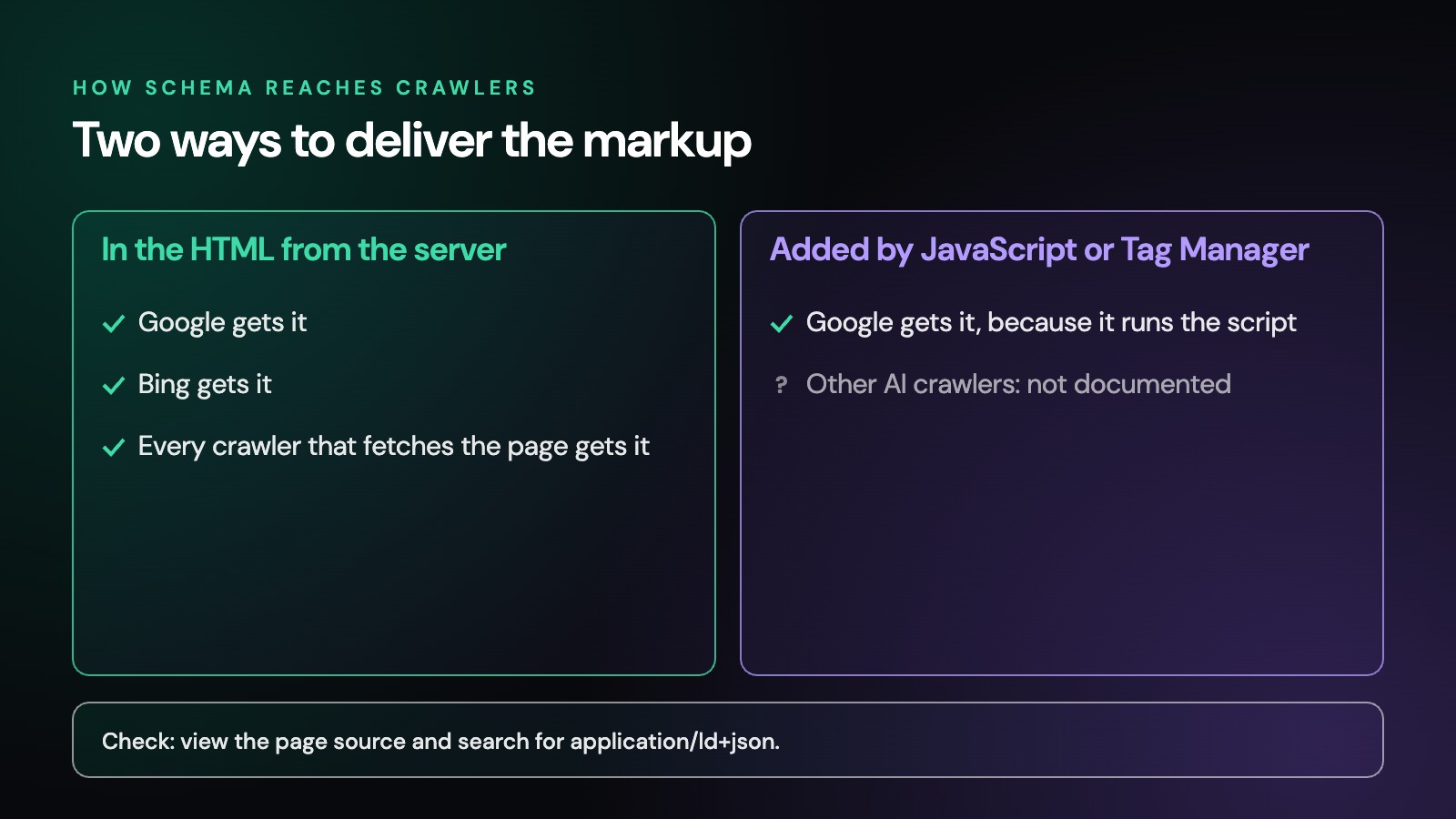
- Put it in the page’s HTML from the start where you can.
Google says it can read JSON-LD that JavaScript adds after the page loads, including through Google Tag Manager. It also warns that markup generated this way for products can make Shopping crawls less frequent and less reliable. Other AI companies do not document whether their crawlers run JavaScript, so markup that is already in the page source is the safer choice.
- Let one tool own each type.
Themes, SEO plugins, review apps and page builders can each print their own Organization or Product block. Two blocks with different details send mixed signals. Pick one source and switch the others off.
- Mark up only what people can see.
Google’s guidelines ask you to skip markup for anything hidden from readers, and Bing says misleading structured data may be ignored.
- Keep it current.
Prices, hours, dates and staff change. Markup that lags behind the page is worse than none, because the code and the page now say two different things.
- Check your platform first.
Google notes that on platforms like WordPress, Wix or Shopify you may add structured data through a settings page or a plugin instead of editing code, and many already add the basics.
How do you test and maintain schema?
- 1. View the page source.
Search for application/ld+json and confirm your markup is in the HTML, not only added later by a script.
- 2. Run Google’s Rich Results Test.
It shows which Google features a page is eligible for and flags errors in those types.
- 3. Run the Schema.org validator.
It checks any schema.org type, including types Google does not use for a search feature, such as Service.
- 4. Read the code against the page.
Every name, number, date and claim in the markup should appear on the page in plain words.
- 5. Watch Search Console.
Its rich result reports flag pages whose markup breaks after a theme or plugin update.
Google warns that markup can break after launch because of templating or serving issues, so check again after site changes, not just once. Our GEO audit checklist puts structured data in its proper place, after the crawler access and business identity checks that matter more.
What should you skip?
- “AI schema” sold as a special product.
Google says there is no special schema.org markup for its AI features. A new type with “AI” in its name is not something any search engine has asked for.
- Markup for things that are not on the page.
Hidden FAQs, invented reviews or services you do not offer can cost a page its rich result eligibility in Google through a manual action, and Bing says it can ignore misleading markup.
- Review stars for your own business.
Google only supports review snippets for LocalBusiness and Organization markup on sites that collect reviews about other businesses. Reviews of your own business, shown on your own site, do not qualify.
- Stacking every type you can find.
More types do not mean more trust. Accurate and complete beats long.
- Confusing schema with llms.txt.
Schema labels the facts inside each page. An llms.txt file is a separate summary file for AI tools, and Google says Google Search ignores it.
- Expecting schema to fix weak pages.
If crawlers cannot reach a page, or the page does not answer the question, markup will not change that.
- Anyone who promises citations.
No one can guarantee a citation from ChatGPT, Google or any other AI tool, and markup does not change that.
Should you add schema yourself or get help?
If your site runs on WordPress, Shopify or Wix, your theme or SEO plugin probably adds some schema already, and you can fill in your business details yourself. Getting help makes sense when your markup comes from several tools that disagree, when you have more than one location, or when you want schema checked as part of a wider look at how search engines and AI tools read your site.
Generative Digital is a one-person practice serving businesses across the US. Schema is one small piece of the program described on our AI SEO agency page, where SEO and AI search are handled together.
What else do people ask about schema for AI search?
Is FAQ schema still worth adding?
Only on pages with a real, visible FAQ. Google stopped showing FAQ rich results in May 2026, so the markup will not change how your Google listing looks. It still states your questions and answers in a form machines can read, and Google has said that unused structured data does not cause problems for Search.
Does Google need schema to show my page in AI Overviews?
No. Google says structured data isn’t required for its generative AI features and there is no special schema.org markup to add. A page only has to be indexed and able to appear in regular results with a text preview. Markup that agrees with the page is still on Google’s list of good SEO basics.
Can AI tools read schema that JavaScript adds?
Google says it can read JSON-LD that JavaScript adds to a page. Other AI companies do not document how their crawlers handle JavaScript. Put important markup in the page’s HTML from the start where you can, and check the page source to confirm it is there.
Is the schema from my SEO plugin enough?
Often it covers the basics, such as WebSite, WebPage, Organization and breadcrumbs. Check that your business details are filled in and correct, that no second tool prints a conflicting copy, and add the types the plugin leaves out, such as Service or LocalBusiness, where they fit.
Can schema markup hurt my site?
Wrong or misleading markup can. Google can take a manual action that removes a page’s eligibility for rich results, though Google says that does not affect how the page ranks in web search. Bing says misleading markup may be ignored and can affect trust. Accurate markup that matches the page carries no such risk.
See what machines can read on your site
Not sure what your schema says, or whether search engines and AI tools can read your site at all? Our free digital audit reviews how search engines and AI tools see your site right now and what to fix first.
Get startedWorking with businesses across the US
© 2026 Generative Digital LLC