Ecommerce SEO services for online stores
Ecommerce SEO services help an online store get found when shoppers search Google, browse Google Shopping or ask an AI tool what to buy. The work centers on the pages that sell: collection and category pages, product pages, and the product data behind them. Generative Digital is an ecommerce SEO agency for online stores and ecommerce brands across the US. We make your catalog simple for crawlers and AI tools to read, sort and recommend, and we tie the results back to orders, not just visits.
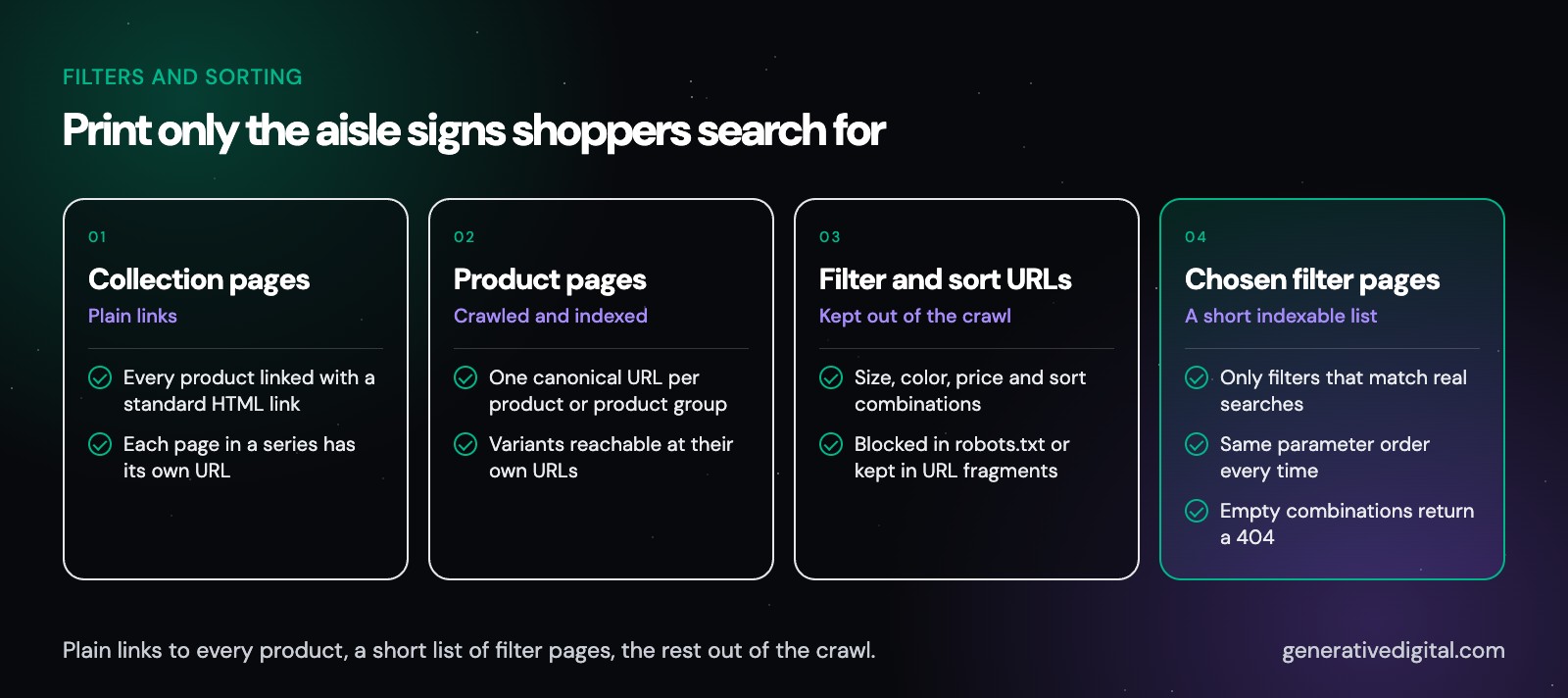
Think of filters as a store that prints a new aisle sign for every mix of size, color and price. A shopper only sees one aisle. A crawler sees thousands of signs and tries to read every one, and it can run out of time before it reaches your newest products. A lot of ecommerce SEO comes down to deciding which signs deserve to exist.
This page is one of our industry guides. It covers what makes store search different and how we approach it. For the rest of what we do, including Google Ads and website builds, see our digital marketing services.
What does an ecommerce SEO agency do?
Ecommerce SEO is search engine optimization for websites that sell products online. Most of the work falls into six areas:
Crawling and indexing.
Making sure search engines can reach every product you want found, and are not wasting time on endless filter and sort URLs.
Collection and product pages.
Titles, copy, images and internal links that match how people actually search for what you sell.
Product data.
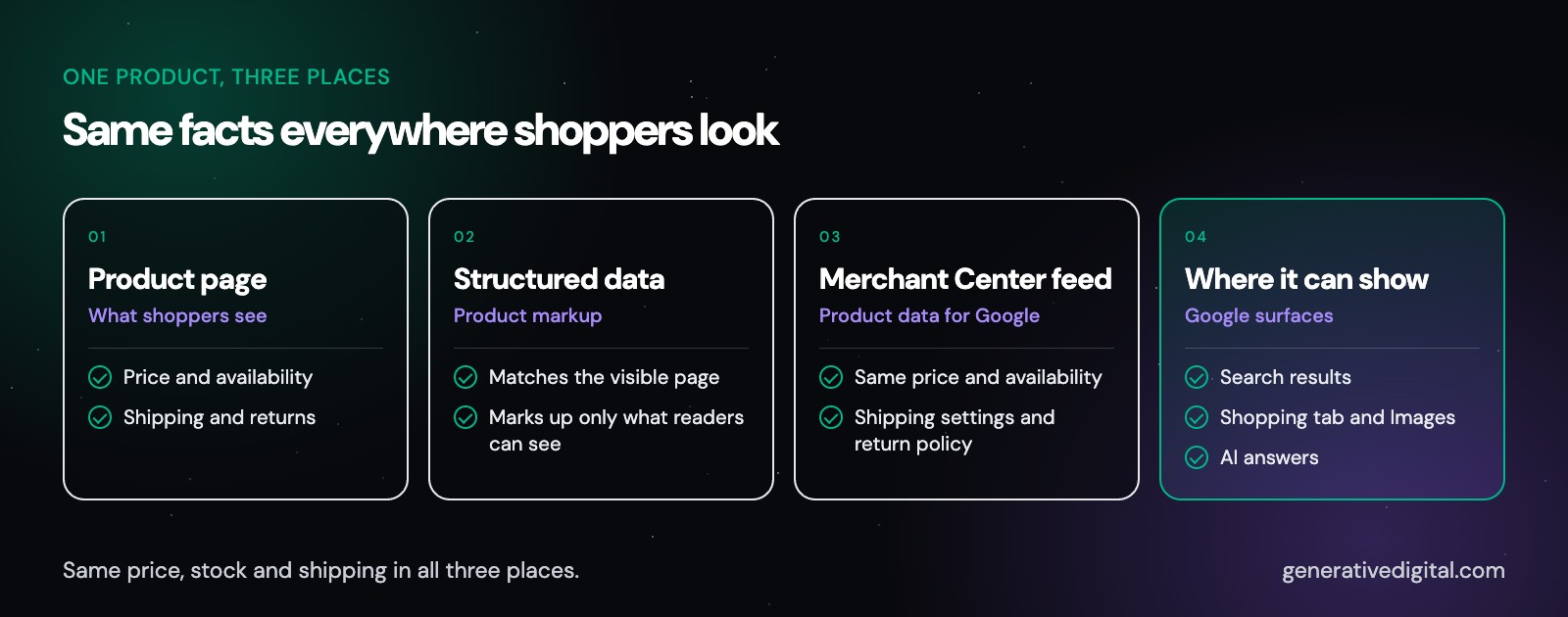
Structured data on your pages and, where it fits, a Google Merchant Center feed, so price, availability and shipping read the same everywhere.
Site speed.
Pages that load fast and stay steady on a phone.
Authority.
Links and mentions from real publications, earned rather than bought.
AI shopping answers.
Making your products and store facts clear enough for ChatGPT, Google AI Overviews and similar tools to recommend accurately.
How is ecommerce SEO different from SEO for other websites?
A service business might have a handful of pages that rarely change. An online store can have thousands, and they change every week. Four things set ecommerce websites apart:
- Scale. Every product, variant, filter and sort option can create a new URL. Google advises keeping the number of alternative URLs that return the same content to a minimum, so its crawlers do not make more requests to your site than needed.
- Constant change. Prices, stock and product lines shift all the time, and search engines need fresh, accurate data to show your products well.
- Search intent close to purchase. Many store searches name a product type, a brand or a feature. Someone searching that way is often ready to buy, so small fixes on the right pages can matter a great deal.
- Platform limits. Most stores run on one of a few ecommerce platforms, and each one controls templates, URLs and some technical files. Good ecommerce SEO starts by learning what your platform lets you change.
Which pages should an online store optimize first?
Start with collection and category pages. They target the broad product searches with the most demand, such as a product type plus a style or material. Product pages come next, because they catch the more specific searches for a model, size or feature.
Google’s own guidance on ecommerce site structure follows the same order. It suggests linking from menus to category pages, from category pages to subcategories, and from subcategories to every product you want indexed. Products that can only be reached through your site search may be missed by Googlebot.
What makes a collection or category page rank?
- One clear topic per page. Each collection targets one group of searches, so two of your own pages never compete for the same search.
- A short, useful introduction. A few plain sentences that help a shopper choose, written by someone who knows the products. Keep it short enough that products stay near the top of the page.
- A descriptive title and heading. Say what the collection is in the words shoppers use, not an internal code name.
- Links to related collections. Point shoppers and crawlers to the next logical step, such as a narrower subcategory.
- Plain links to every product. Google says not to use JavaScript events on other page elements for navigation, so product links should be ordinary HTML links.
What belongs on a product page?
- A unique title tag with the product name and the detail people search for, such as material, size range or model number.
- Your own description, not only the manufacturer’s copy that every other seller also uses. Say who the product suits, how it fits or works, and what comes in the box.
- Clear photos of the actual product, with alt text that describes what each image shows.
- Price, availability, shipping and returns in plain text, matching what your structured data and product feed say.
- Honest reviews from real customers, displayed as written.
- Links back up to the product’s collection and across to closely related products.
How should product variants be handled?
Colors and sizes are where duplicate content often starts. Google recommends that each variant can be reached at its own URL, and that when variants use optional query parameters, the URL without the parameter serves as the canonical. Google’s ProductGroup markup then tells search engines which products are variations of the same parent. If all your variants live on one page, Google asks for a single canonical URL for the whole group. Either approach works when it is set up on purpose.
How do you keep filters and sorting from creating duplicate URLs?
Filters and sort options help shoppers, but every combination can produce a new URL. Google calls this faceted navigation and warns that crawlers can end up fetching a very large number of these URLs, which leaves less time for new, useful pages. This is one of the most common technical SEO problems on large catalogs.
What should you do with filter and sort URLs?
Google’s guidance comes down to two choices:
- If you do not need a filter page in search, keep it out of the crawl. Disallow those URLs in robots.txt, or build the filters with URL fragments, the part after a # sign, which Google generally does not crawl.
- If you do want a filter page indexed, make it clean. Use the standard ampersand separator between parameters, keep filters in the same order every time, and return a 404 status when a combination has no products.
Google adds that canonical tags and nofollow are generally less effective in the long term than those two methods. In practice, most stores want a short list of filter pages indexed, usually the ones that match real searches, and the rest kept out. We build that list from your own search data.
How should paginated collections and infinite scroll work?
Google recommends giving each page in a series its own URL, such as one ending in ?page=2, and linking each page to the next one with a standard link. Each page should be its own canonical, not page one. Google also notes that it no longer uses rel=next and rel=prev.
Load more buttons and infinite scroll are usually built with JavaScript, and Google says its crawlers generally do not trigger JavaScript that needs a user action. If your collections work that way, an XML sitemap or a Merchant Center feed helps Google find every product.
How does SEO work on a Shopify store?
Shopify handles a lot of SEO basics for you, including canonical tags, a sitemap, robots.txt and product schema in its themes. The work that remains sits in the details: how your theme links to products, which apps add code, how redirects behave and which pages stay out of search. Our page on Shopify SEO services covers each one. Generative Digital is a Shopify Partner.
Which structured data should an online store use?
Structured data is code that labels facts on a page, such as a product’s name, price, availability and reviews, so machines do not have to guess. For a store, the main type is Product. Google uses it for two kinds of results:
- Merchant listings for pages where customers can buy the product from you. These can show details like shipping and return policy.
- Product snippets for pages where people cannot buy directly, such as review or comparison pages.
Google states that pages meeting the merchant listing requirements can also be eligible for product snippets. Two rules apply to all of it. Google’s guidelines ask you to mark up only what readers can actually see on the page, and they state that structured data does not guarantee a rich result. Accurate markup earns eligibility, not a promise.
How does Google Merchant Center fit in?
Merchant Center is where you send Google a feed of your product data. Google says a feed is not required to appear in Google Search results, but it recommends using both structured data and a feed, and some Google surfaces require Merchant Center participation.
With free listings, Merchant Center lets your products appear at no cost across Google, including Search, the Shopping tab, Google Images and, in some cases, YouTube and Maps. To be eligible, products need core details such as an ID, title, link, image, price, description and availability, and US stores need shipping settings. Google also asks you to show your return policy. We check that your feed, your structured data and your visible product pages all say the same thing. If you also run Google Ads, the same feed powers your Shopping campaigns.
Does site speed matter for ecommerce SEO?
Yes, though it is not the whole story. Google measures page experience with Core Web Vitals and suggests aiming for a Largest Contentful Paint within 2.5 seconds, an Interaction to Next Paint under 200 milliseconds and a Cumulative Layout Shift under 0.1. Google also says Search always seeks to show the most relevant content, even if the page experience is sub-par. Speed will not rescue a thin product page, but a slow, jumpy page makes every other improvement work harder.
On store templates, the usual suspects are oversized product images, extra app scripts and layouts that shift while they load.
How do AI shopping answers choose products?
AI tools now answer a lot of product questions directly. A few things are known from the platforms themselves:
- ChatGPT. OpenAI says product results in ChatGPT are not ads and are selected independently. It ranks merchants by factors such as availability, price, quality and whether the merchant is the maker or the primary seller. It builds merchant lists from product metadata supplied by third-party providers or by merchants directly. Merchants can also apply to OpenAI to submit a product feed.
- Search access. OpenAI says a site that opts out of its OAI-SearchBot crawler is left out of ChatGPT search answers, apart from navigational links. Check that your robots.txt and any bot-blocking settings at your host or platform let it in.
- Google AI Overviews and AI Mode. Google states that these features need nothing beyond normal SEO best practices, with no special markup or files. Its checklist includes keeping Merchant Center information up to date and making sure structured data matches the visible text on the page. Google also describes query fan-out, where one question is split into several related searches on subtopics and the results are combined into one answer.
What helps most is consistent, plain product information: accurate prices and stock everywhere, clear answers on the page to the questions shoppers ask before buying, and store policies that are easy to find. Our answer engine optimization guide covers the wider method, and our GEO audit checklist lets you test your own site first.
How should an online store earn links?
Links still help search engines find and weigh your pages, but only the honest kind. Google’s spam policies treat buying or selling links for ranking purposes as link spam. That includes exchanging goods or services for links and sending someone a product in exchange for writing about it and including a link. So skip link packages and paid placements dressed up as reviews.
Links that hold up usually come from real work:
- Digital PR. Original product knowledge, data you own or a useful guide that writers want to cite on their own.
- Buying guides and comparisons. Content marketing that helps a shopper choose earns links and answers the questions AI tools pick up.
- Partners you already work with. Makers, suppliers and stockists who choose to list where their products are sold.
What do our ecommerce SEO services include?
Our ecommerce SEO services are shaped by what your store actually needs. Most engagements cover:
- A technical SEO review. A full crawl, a look at site architecture, the Search Console indexing report and a check of filters, pagination, variants and canonical tags.
- Keyword research and mapping. Each group of searches assigned to one collection or product page, starting from the queries that already bring people to your site.
- Collection and product page work. Titles, introductions, descriptions and internal links, written for shoppers first.
- Product data. Structured data and your Merchant Center feed checked against each other and against the page.
- Speed. Images, scripts and apps reviewed on the templates that matter most.
- AI search checks. A fixed set of shopper questions run through the AI tools your customers use, repeated on a schedule.
- Local SEO, if you have a storefront. A Google Business Profile with accurate hours and products.
Four things shape how we work:
- A free audit to start. Our free digital audit shows what is working on your store and what to fix first.
- One person does the work. Generative Digital is a single-operator practice on purpose. Whoever audits your store makes the fixes and answers your email.
- Search and ads from one plan. We run Google Ads as well as SEO, so paid and organic shopping work from the same product data and tracking. The same approach drives our AI SEO agency work.
- No passwords. We never ask for your login details. You add us as a user on your store and the tools we need.
How do you measure ecommerce SEO?
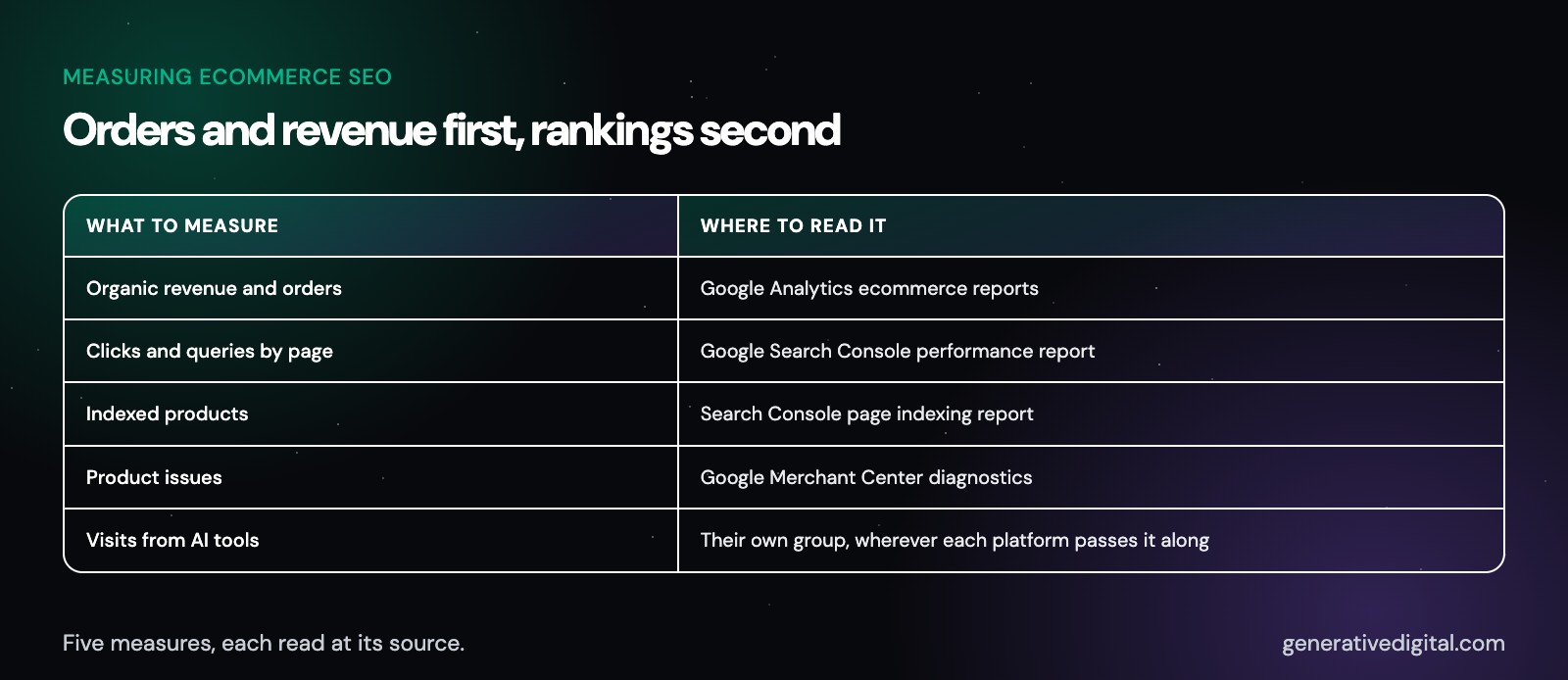
Search rankings are an early sign, not the goal. Ecommerce SEO is measured in orders and revenue:
- Organic revenue and orders from Google Analytics ecommerce reporting, split by collection and product where possible.
- Clicks and queries by page from Google Search Console, so you can see which collections are gaining.
- Indexed products from the Search Console indexing report, compared with how many products you actually sell.
- Merchant Center product issues, so disapproved or limited products get fixed quickly.
- Visits from AI tools, grouped separately wherever each platform makes that possible.
If a number was not measured, our reports say so instead of estimating it.
months
When should you expect to see movement?
For organic search, three to four months as a general guide is a fair window for changes to show up in traffic and sales. Large catalogs, crowded product categories and new stores often take longer. No agency controls whether Google or an AI tool features your products for a given search, and a promise otherwise is a red flag. What we commit to is steady work, clear monthly reports and plain answers about what is and is not moving.
What else do store owners ask about ecommerce SEO?
Is Shopify already good for SEO?
Shopify covers the basics, including canonical tags, a sitemap, a default robots.txt and product schema in its themes. What it cannot do for you is choose which collections to build, write product copy that stands out, keep apps from slowing pages down or decide which filter pages deserve to be indexed. That part is still up to your in-house team or the agency you hire.
Should my store use structured data, a Merchant Center feed or both?
Both, in most cases. Google recommends using structured data on product pages and a Merchant Center feed together, and some Google surfaces require Merchant Center. Keep the price, availability and shipping details the same in both and on the visible page.
Can SEO replace paid ads for an online store?
Usually not entirely, and it does not need to. SEO builds organic traffic you do not pay for per click, while ads reach shoppers right away and test new products. The two work best from the same product data and tracking, which is why we plan them together.
Can you work on our store without a rebuild?
In most cases, yes. We start by mapping what your platform and theme let you change and what needs a developer. A rebuild only makes sense when the current setup blocks the fixes that matter most, and we will say so plainly if it does.
How long does ecommerce SEO take to show results?
Three to four months as a general guide is a fair first checkpoint for measurable change in search. Large catalogs, competitive categories and new stores often need longer.
See where your store stands today
The quickest way to know what to fix is to look. Our free digital audit reviews your store, which product and collection pages Google has indexed and how AI tools describe your brand, then shows you what to fix first. It costs nothing, and most audits come back within 48 hours.
Get startedWorking with businesses across the US
© 2026 Generative Digital LLC