Shopify SEO services built around how Shopify works
Shopify SEO services help a Shopify store get found in Google, in shopping results and in AI shopping answers by working with the way Shopify builds pages, URLs and product data. Shopify sets up a lot for you. The gaps sit in the details it leaves open: theme links, redirects, apps, hidden pages and how your catalog reaches AI tools. Generative Digital offers Shopify SEO services to online stores across the US, and the person who audits your store is the person who makes the fixes.
Think of Shopify as a well-run shopping mall. The mall handles the doors, the lights and the directory sign. You still decide what goes in your window, where your aisles run and which back rooms stay closed. Shopify SEO is the work on everything the mall leaves to you.
This page goes deep on Shopify. For the wider playbook on collections, filters, Merchant Center and product structured data on any platform, start with our guide to ecommerce SEO services.
What do Shopify SEO services cover?
Shopify SEO is search engine optimization for stores built on Shopify. The goals match any online store. The methods change, because Shopify locks some things in place and hands others to your theme and your apps. Our Shopify SEO services cover eight areas:
Theme and templates
How your theme writes links, headings, title tags and product markup.
Duplicate URLs
Product paths inside collections, tag pages, and filter and sort URLs.
Indexing controls
Which products and pages stay out of search, and which setting hides them.
Redirects
Handle changes, retired products and platform moves.
Apps
The scripts and extra markup each app adds to your pages.
International stores
Markets, languages and hreflang tags.
AI shopping visibility
How your catalog reaches ChatGPT, Copilot and other AI channels.
Reporting
Orders and revenue from organic search, not just rankings.
How is Shopify SEO different from ecommerce SEO in general?
Most ecommerce SEO advice assumes you control the whole website. On Shopify, you share control. Shopify’s help center lists fixed paths, such as /products and /collections, that cannot be redirected. The robots.txt file is generated for you, and Shopify calls custom edits to it an unsupported customization. Your theme decides much of what search engines see, and the apps you install can add code to pages you never touch.
So good Shopify SEO starts with a question many audits skip. Is this fix a setting, a theme change, an app change or something Shopify does not allow? We answer that before any work is scoped, so every recommendation is one that can actually be carried out.
What does Shopify handle on its own, and what is left to you?
Shopify’s SEO overview says it handles many technical tasks automatically, including sitemaps, canonical tags, SSL certificates and product structured data in its themes. That is a strong head start. Shopify’s own documentation is just as clear about what it leaves to the merchant:
- Redirects for products you move or discontinue. Shopify’s overview tells merchants to set up 301 redirects themselves.
- Search engine listings for each product, collection, page and blog post, meaning the title and description that show in search results.
- Alt text for your product images.
- Pages to hide from search, such as test products or thank-you pages.
- Site structure, running from general collections down to specific products.
Shopify also notes that Google does not index every page on a site. Checking which of your products and collections made it in is one of the first things we do.
Why does Shopify create duplicate product URLs?
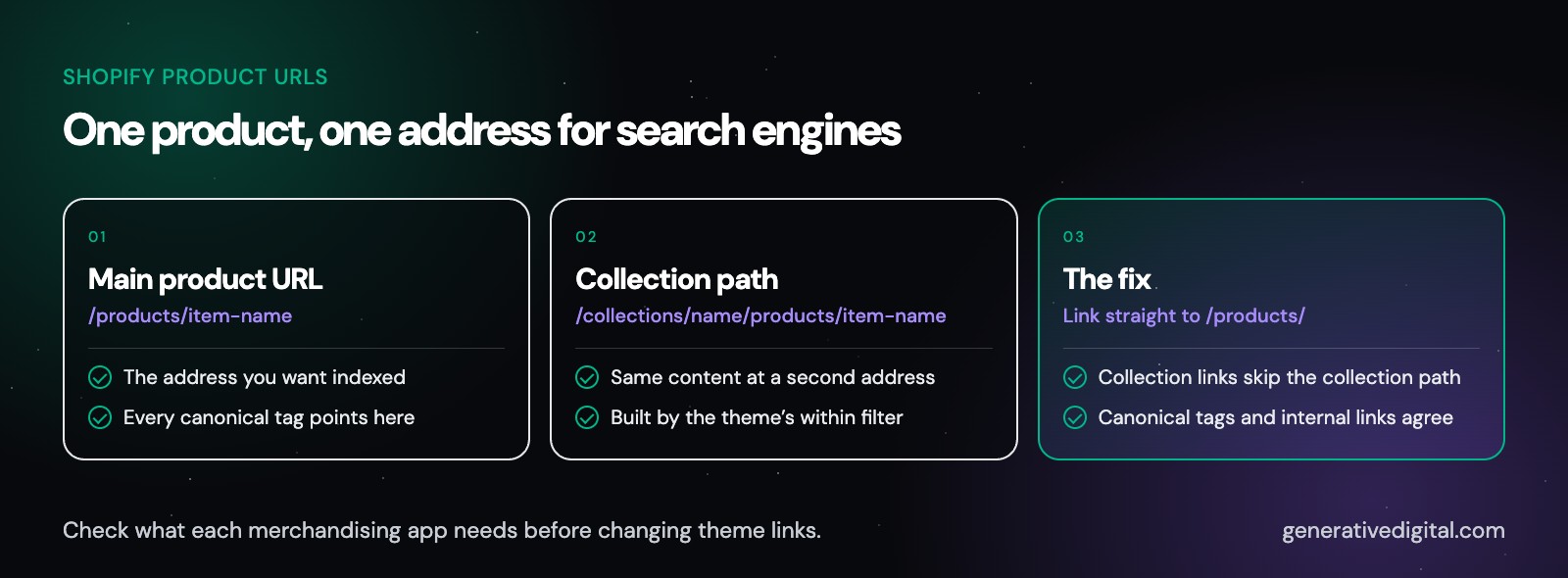
On Shopify, a product can load at its own address and again inside each collection it belongs to. Shopify’s developer documentation for the within filter, the theme code that builds those collection product links, puts it plainly: a standard product page and a product page in the context of a collection have the same content on separate URLs. Shopify adds canonical tags so search engines know which version to show. Even so, every extra path is one more URL for crawlers to fetch.
What should collection links point to?
In most stores, collection pages should link straight to the main product URL, the one that starts with /products/. Then your canonical tags and your internal links agree, and crawlers spend their visits on real pages. Many themes can do this with a small template change. Some merchandising apps rely on the collection path, so we check what each app needs before changing anything.
What about tag, filter and sort pages?
According to Shopify’s help center, the default robots.txt already includes rules that block some duplicate pages, such as filtered and sorted collection URLs. That covers a lot, but not every case. Product tags can create their own collection views, and filter apps may build URLs the default rules do not expect. We crawl your store to see which of these URLs search engines can reach, then decide case by case. When a filtered view matches a real search, a dedicated collection page usually does that job better than a filter URL.
How do you hide a page from search on Shopify?
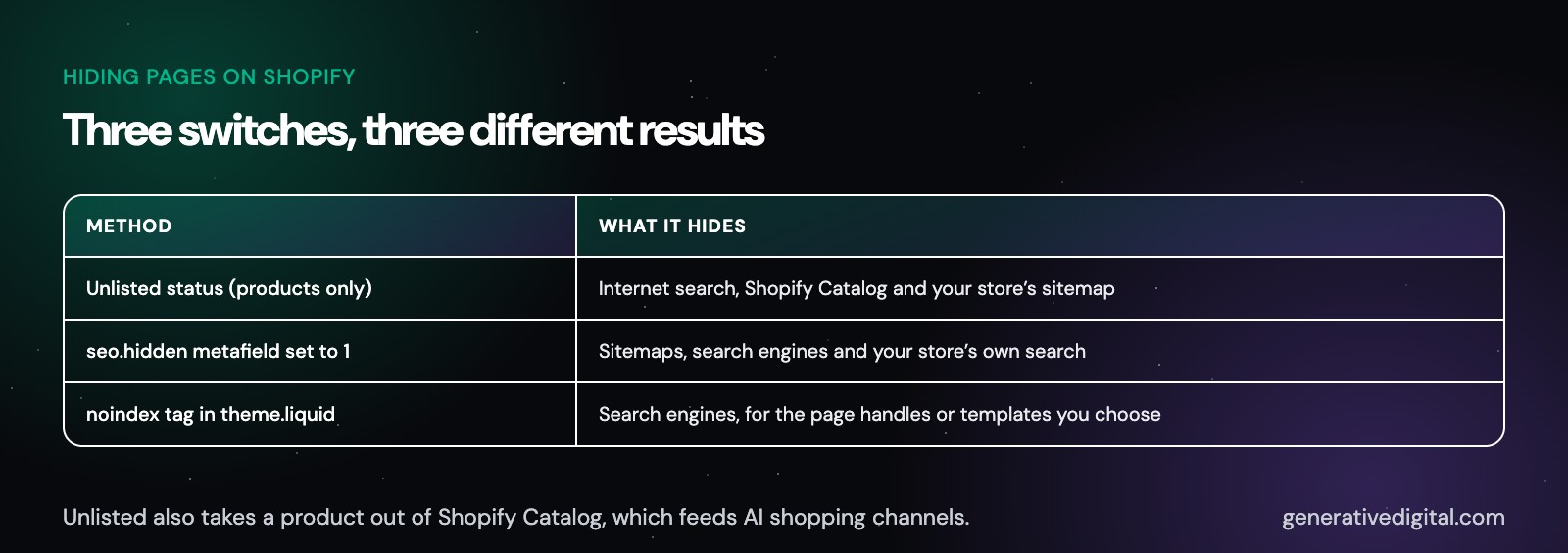
Shopify gives you three ways to keep something out of search, and each one behaves differently:
- Unlisted status, for products only. Shopify says an unlisted product is hidden from internet search, Shopify Catalog and your store’s sitemap.
- The seo.hidden metafield. Set to 1, it hides a page, blog post or product from sitemaps, search engines and your store’s own search.
- A noindex tag in your theme. Added in the theme.liquid file for chosen page handles or templates, such as your internal search results page.
Pick the wrong one and you can hide more than you meant to. Unlisted status also takes a product out of Shopify Catalog, which feeds AI shopping channels. We match the method to the goal and keep a record of everything hidden, so nothing stays out of search by accident.
How do redirects work on Shopify?
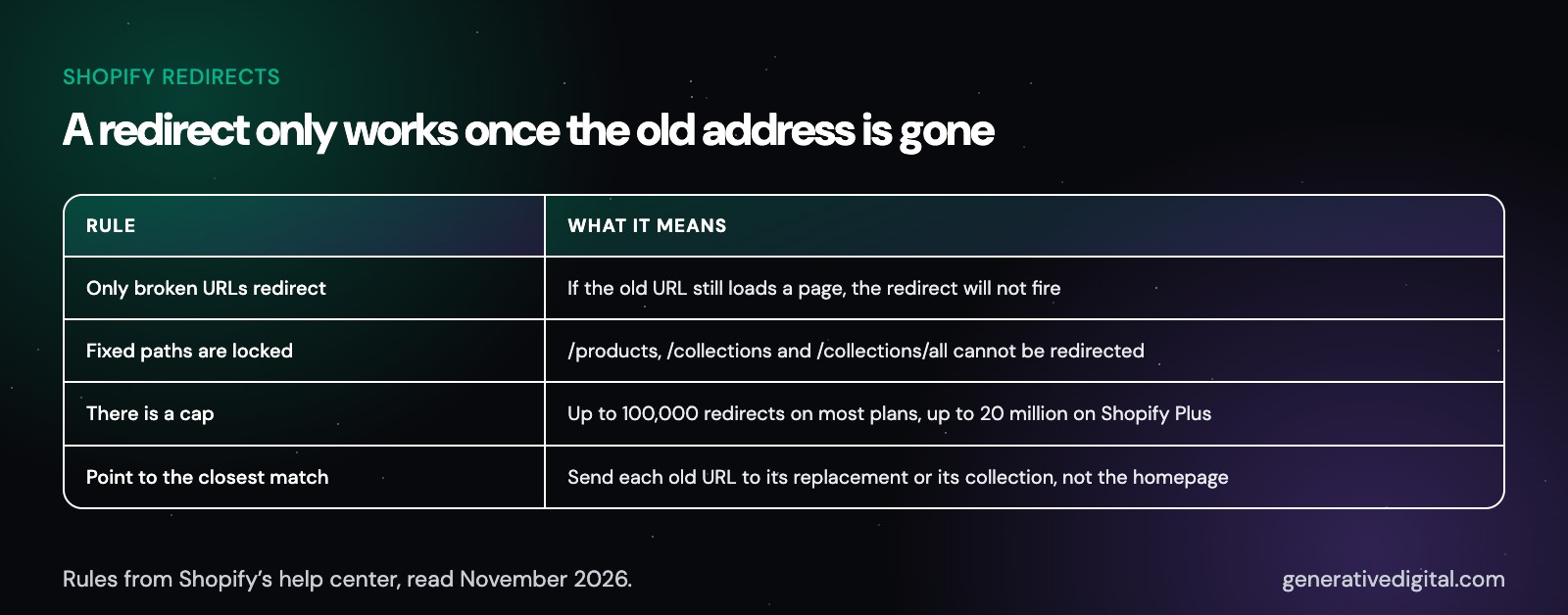
Shopify has a built-in redirect tool, with a few rules that catch people out. According to its help center:
- You can redirect only from broken URLs. If the old URL still loads a page, the redirect will not fire.
- Fixed paths cannot be redirected. That includes /products, /collections and /collections/all.
- There is a cap. Most plans allow up to 100,000 URL redirects, and Shopify Plus allows up to 20 million.
So when a product is retired, the old URL has to stop loading before a redirect can take over. We point each old URL to the closest live match, such as its replacement or its collection, rather than sending everything to the homepage.
How do you move to Shopify without losing search traffic?
A platform move puts every URL you have at risk, because your new Shopify paths will rarely match the old ones. Google’s guidance for site moves comes down to a few steps:
- Map every old URL to its new URL before launch.
- Use permanent redirects, such as 301 redirects.
- Keep the redirects as long as possible, generally at least one year, according to Google.
- Update internal links to the new URLs instead of leaning on redirects.
- Submit the new sitemap in Google Search Console.
Google also says to expect temporary ranking changes during a move, and that a medium-sized site can take a few weeks or more before Google shows the new URLs, with larger sites taking longer. Shopify’s own SEO FAQ lists missing redirects after a migration as one reason a store may not appear in search results.
We build the URL map before launch, load the redirects into Shopify, then crawl the old URLs after launch to confirm each one lands where it should. Since we build Shopify stores as well, the SEO plan and the build can run as one project.
Do apps and themes affect Shopify SEO?
Yes. When a page is missing a title tag or an H1, Shopify’s own SEO FAQ points to custom code or an app as the likely cause. Apps and themes shape what search engines see in three main ways:
- Speed. Apps can add scripts, and theme sections add images and fonts. Heavy product and collection templates load slowly on phones.
- Duplicate markup. A review app, an SEO app and the theme can each print their own product structured data. Two copies that disagree help no one.
- Content loaded by script. Some apps add reviews, size charts or FAQs with JavaScript after the page loads. Shopify’s FAQ says the most reliable check is how search engines render the page, so we use Google’s URL Inspection tool to see what Google actually gets.
We also look for code left behind by apps you no longer use, and we list what every remaining app adds to your product and collection pages.
How does Shopify SEO work for international stores?
Shopify Markets does much of the setup. According to Shopify’s help center, hreflang tags are generated automatically from your market and language settings, sitemaps include market-specific URLs, and subfolders are the recommended structure for most stores. Shopify also warns to use either your own hreflang tags or the automatic ones, not both.
The problems we look for are usually small and easy to miss: a theme or app printing a second set of hreflang tags, markets that share a language and serve nearly identical pages, and translated pages that still carry the original language in their titles. We check the tags your pages actually output, market by market.
How do Shopify stores show up in AI shopping answers?
Shopify now connects stores to AI shopping tools directly. Its developer changelog from May 2026 says products are automatically accessible to AI channels like ChatGPT, Shop and Copilot through Shopify Catalog, managed from an Agentic Storefronts page in the Shopify admin. Your product data in Shopify is what those channels read.
Shopify’s guide to optimizing a store for AI asks for detailed specifications, comparison information and product attributes on product pages.
Our part is making that data complete and consistent: product titles that say what the item is, attributes filled in, policies easy to find, and nothing important hidden by an Unlisted status or a blocked crawler. For the wider method, see our generative engine optimization services, or test your own site first with our GEO audit checklist.
What should you look for in a Shopify SEO agency?
A good Shopify SEO agency knows the platform’s limits as well as it knows SEO. Five questions sort the field quickly:
- Who makes the fixes? An audit full of theme changes only helps if someone can carry them out in Liquid, Shopify’s template language.
- How will you get access? A careful agency asks you to invite it from your Shopify admin and never asks for your password.
- How will you handle robots.txt? Shopify calls edits to the robots.txt.liquid file unsupported and warns that incorrect use can result in the loss of all traffic. The answer should be cautious.
- What will you report? Orders and revenue from organic search should come before rankings.
- What do you promise? No one controls Google’s results or AI answers. A guaranteed ranking is a reason to walk away.
What do our Shopify SEO services include?
The work usually includes:
- A full crawl of your product, collection, page and blog URLs, checked against the Search Console indexing report.
- A theme review covering internal links, headings, title templates and structured data output.
- A redirect map for retired products and past URL changes.
- An app review, listing what each app adds to your pages.
- Search listings for key collections and products, written in the words shoppers use.
- International checks for stores selling in more than one market.
- AI shopping checks, asking a set list of buyer questions in ChatGPT and other AI tools on a regular schedule and saving the answers, so changes are easy to spot.
How we work:
- One person, start to finish. Generative Digital is a single-operator practice. You talk to the person doing the work.
- Search and ads together. We also manage Google Ads, so paid and organic search run on the same product data. See all of our digital marketing services.
- AI search in the same plan. Getting named in AI answers is part of the work, the same way it is in our AI SEO agency program.
- Straight talk about the platform. If Shopify does not allow a fix, we say so and suggest the closest option.
months
When will you see results?
Before judging organic traffic and sales, allow three to four months as a general guide. Technical fixes, such as redirects and duplicate URLs, can be checked in Search Console as Google recrawls the affected pages. Large catalogs, new stores and stores that just changed platforms often need longer. No one can promise where Google or an AI tool will place your products, and we will not.
What else do Shopify store owners ask?
Does Shopify offer its own SEO services?
Yes. Shopify runs an SEO team through its professional services that works with Shopify brands and partners. Independent agencies offer Shopify SEO services too. Whoever you hire, ask who makes the theme changes and how results will be reported.
Do I need an SEO app on Shopify?
Not always. Shopify already handles sitemaps, canonical tags and product markup in its themes, so an app is only worth adding when it does something your store is missing. Before you install one, check that it will not print a second copy of your structured data or slow down your product pages.
Do Shopify tags help SEO?
Tags are mainly an internal label for organizing products and building collections. Tag-filtered collection views can create extra URLs, so when a tag matches a real search, it is usually better to turn it into a full collection page with its own title and introduction.
Is headless Shopify better for SEO?
Not by itself. A headless build can be fast, but it moves jobs a Shopify theme already handles, such as canonical tags, sitemaps and product markup, onto your own developers. It makes sense when a store has needs a theme cannot meet and a team to maintain the code.
How long does Shopify SEO take?
Allow three to four months as a general guide before you judge the first results. Large catalogs, crowded categories and stores that just changed platforms often need longer.
See how search engines read your Shopify store
The fastest way to find what is holding your store back is to look. Our free digital audit checks which of your products and collections Google has indexed, how your theme and apps shape each page, and what AI tools say about your store, then ranks what to fix first. It costs nothing, and most audits come back within 48 hours.
Get startedWorking with businesses across the US
© 2026 Generative Digital LLC