Medical SEO: how doctors and medical practices get found in search
Medical SEO is the work of helping a doctor or medical practice show up in Google when patients search for a condition, a service, a symptom or a doctor nearby. It covers the pages on your website, the technical health of the site, your Google Business Profile listings and the trust signals Google looks for on health topics. This guide walks through each part in the order we usually fix them.
It sits under our page on healthcare SEO, which covers credentials, multi-location structure and advertising rules for practices. Here the focus is the search work itself: what patients type, which pages answer them and what keeps Google from showing those pages.
What is medical SEO, and how is it different from regular SEO?
The tools are the same as in any other field. Pages need clear topics, Google needs to be able to crawl and index them, and other sites need reasons to mention you. What changes is the standard. Google calls health a “Your Money or Your Life” topic, and its guide to helpful content says that for these topics, “the content must be highly accurate and consistent with established expert consensus.”
Think of each page on your site as a patient chart that Google reads. A good chart has one chief complaint at the top, a clear history and a signature from the clinician who wrote it. A good medical page works the same way. It covers one main topic, states the facts plainly and names the provider who reviewed it. A page that tries to cover five conditions at once, with no name on it, reads like a chart nobody would sign.
How do patients search for a doctor or a medical practice?
Patients rarely search the way a clinician talks. Google’s own SEO starter guide notes that people who know a lot about a topic “might use different keywords in their search queries than someone who is new to the topic.” In medicine that gap is wide.
Most patient searches fall into a few groups:
- Symptoms and conditions.
What a patient feels or has been told they have, often in everyday words.
- Services and tests.
A specific visit, screening or procedure the patient already knows they need.
- A type of doctor nearby.
A specialty plus “near me” or a town, which is where your map listing matters most.
- A doctor by name.
Usually a referral, a returning patient or someone checking reviews before a first visit.
- Practical questions.
Insurance accepted, new patient openings, hours, telehealth and parking.
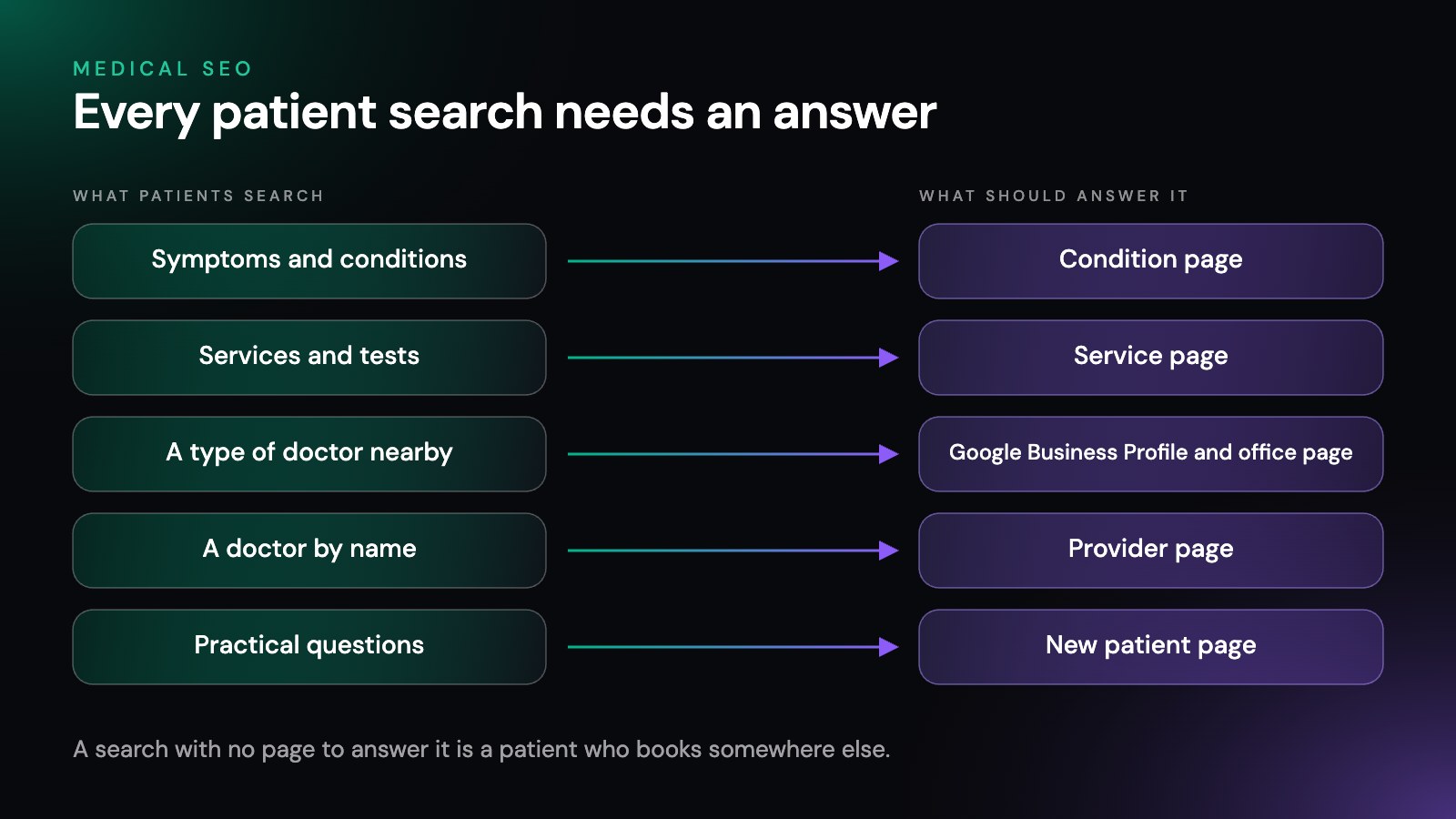
Good keyword research for a practice maps each group to a page. The symptom and condition searches need clear condition pages. The “near me” searches need correct listings. The name searches need provider pages that load fast and match the listing.
Which pages does a medical practice website need?
Most practice sites have too few pages that answer a real question and too many that say the same thing in different words.
As a general guide, a practice site that does well in search has:
- One page for each main service or condition you treat.
Written in plain words, covering who it is for, what a visit involves and how to book.
- One page for each provider.
Training, specialties, the services that provider performs and the offices where they see patients.
- One page for each office.
Address, hours, parking, the providers who work there and the services that office offers.
- A new patient page.
Insurance, forms, what to bring and how to book, in text rather than a scanned PDF.
Every page should earn its place. Google’s spam policies name “doorway abuse,” including “multiple domain names or pages targeted at specific regions or cities that funnel users to one page.” A page for a town you do not have an office in, with the same text as every other town page, is the kind of page that policy describes. Build an office page only where you have an office, and describe only the services that office provides. Dental practices have a few extra pages to plan for, covered in our guide to dental SEO.
What technical problems hold medical websites back?
Many practice sites look fine to a patient and still give Google trouble.
These are the problems we find most often on medical sites:
- Pages Google has not indexed.
Check the indexing reports in Google Search Console. A page that is not indexed cannot rank, however good it is.
- A noindex tag or a blocked folder left over from a site rebuild.
One setting left on after launch can hide a whole section of service pages.
- Duplicate pages.
The same condition page at two addresses, or a print version that copies the main page. Google’s guide on canonical URLs says to link “to the canonical URL rather than a duplicate URL” so it understands which version you prefer.
- Booking, forms and patient portals on another domain.
That is often fine for patients, but the pages that explain your services should live on your own site, where they can build up search value.
- Tracking tags on forms and booking pages.
The HHS bulletin on tracking technologies says a tag on a page where someone schedules an appointment or uses a symptom checker without logging in may have access to protected health information, and a June 2024 federal court order vacated a separate part of that bulletin, the part about linking a visitor’s IP address to a visit to a public page about health conditions or providers. Have your compliance lead or attorney approve any tag on pages where patients enter their details.
- Slow pages on a phone.
Google’s Core Web Vitals guidance sets targets for a good experience: the largest element loads within 2.5 seconds, the page responds to a tap in under 200 milliseconds, and the layout shift score stays under 0.1. Large photos and chat widgets are common causes of slow medical pages.
- Key details trapped in images or PDFs.
Hours, insurance lists and new patient steps should be plain text a search engine can read.
What does SEO for doctors look like for an individual provider?
SEO for doctors starts with the provider page and the provider’s own Google Business Profile. Google’s guidelines name doctors as individual practitioners and say a practitioner should have their own profile if they work in a public-facing role and “can be contacted directly at the verified location during stated hours.”
A few of Google’s rules matter most for practices with several doctors:
- The practice and each doctor get separate profiles.
At a location with several public-facing doctors, the practice keeps a profile for that office, and each doctor’s profile stands apart from it.
- The doctor’s profile carries only the doctor’s name.
Google says the practitioner’s profile title “should include only the name of the practitioner, and shouldn’t include the name of the organization.” It may include a title or degree, such as Dr. or MD.
- One profile per doctor, not one per specialty.
Google says a practitioner “shouldn’t have multiple Business Profiles to cover all of their specializations.”
- A solo doctor at a branded practice shares one profile.
In that case Google suggests a single profile named in the format brand, then a colon, then the practitioner’s name.
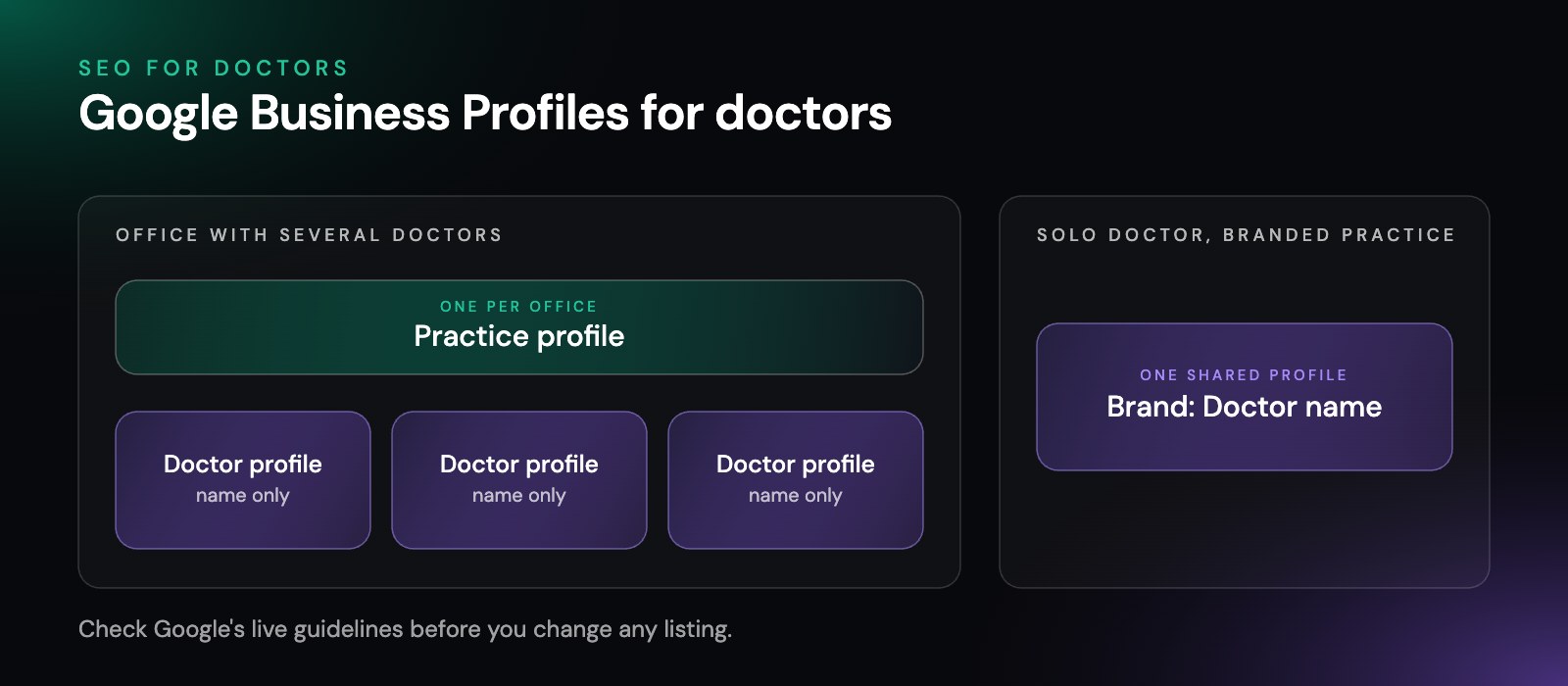
The provider page on your website should match that profile: the same name form, the same office, the same phone number. When the page and the listing agree, Google has an easier time treating them as one doctor. For how the same setup helps AI tools tell your doctors apart, read our page on GEO for healthcare.
Which structured data fits a medical practice?
Structured data is code added to a page that tells search engines, in a fixed format, what each fact on the page means. Google’s documentation on local business structured data says to “Use the most specific LocalBusiness sub-type possible.” Schema.org, the shared vocabulary search engines read, includes medical types such as MedicalClinic, Physician and IndividualPhysician, which it describes as “An individual medical practitioner.”
Three rules keep structured data honest:
- List only services the practice actually offers.
A service in the code that is not on the page, or not offered at that office, is a false claim.
- Copy credentials from each provider’s live bio exactly.
Fellowship training is never written as board certification, and a membership that is not on the bio stays out of the code.
- Keep addresses and phone numbers identical
across the code, the page and the Business Profile.
Structured data will not make a weak page rank. It helps Google read a strong one. Our guide to schema markup for AI search covers what it does and does not do in AI answers.
Who should write and review medical content?
A provider should review every clinical page before it goes live, and the page should say so. Google’s guide to helpful content says it strongly encourages “accurate authorship information, such as bylines to content where readers might expect it.”
In practice that means:
- A named reviewer on each clinical page,
linked to that provider’s bio, with the date of the last review.
- Plain descriptions, not promises.
Describe what a service involves and who it may suit. Outcomes belong in the conversation between a patient and their provider.
- No invented experts.
Every name on the site should be a real person at the practice.
- A regular review cycle.
Medical guidance changes. Put each clinical page on a schedule for the provider to read again.
How do links and mentions help a medical practice?
Links from other websites still tell Google that a practice is real and trusted. For a medical practice, the best links usually come from relationships you already have: hospital affiliations, professional associations, medical school faculty pages, local community groups you support and the health directories where patients look for doctors.
Two cautions apply. First, keep your details the same everywhere, because a directory with an old address works against you. Second, never pay for a link. Paid links are named as link spam in Google’s spam policies, and the same page warns that sites breaking those policies “may rank lower in results or not appear in results at all.”
How do you track medical practice SEO?
Medical practice SEO is easier to judge when you track a few numbers that tie to the schedule.
We look at:
- Search Console clicks and impressions by page,
so you can see which condition and service pages are gaining ground.
- Business Profile calls, direction requests and website clicks
for each office and each provider.
- Phone calls and booking requests from organic search,
counted once each.
- Index coverage,
to catch pages that drop out of Google before they cost you patients.
Rankings for a handful of terms are worth a glance, but they move every day and differ by location. The trend over a few months is what matters. For how search fits with ads, reviews and email, see our guide to healthcare digital marketing.
What else do doctors ask about medical SEO?
Is medical SEO the same as healthcare SEO?
Mostly, yes. The two terms describe the same work. People tend to say medical SEO when they mean doctors, clinics and medical groups, and healthcare SEO when they include a wider range of care. The technical work, the page structure and the review rules are the same.
Can anyone guarantee my practice a top ranking?
No. No one can guarantee a ranking in Google, because Google decides what it shows and changes its systems often. Be wary of any agency that promises one. A good partner commits to the work, to reports you can check and to an honest read on what is moving.
Should every doctor at our practice have a Google Business Profile?
Usually, if they see patients directly. Google’s guidelines say a doctor who works in a public-facing role and can be reached at the verified location during stated hours may have their own profile. Support staff should not. A solo doctor at a branded practice usually shares one profile with the practice.
Do we need a blog to rank?
Not to start. Service, condition, provider and office pages answer most of what patients search for, so build and review those first. Articles help once the core pages are solid, as long as a provider reviews each one.
How long does medical SEO take to work?
For most practices, search results start to move in three to four months as a general guide. A new website, a crowded specialty or a site with technical problems can take longer.
How visible is your practice in search today?
Generative Digital is run by one person, and that person does the SEO work for doctors and medical groups across the US, along with AI search, paid search and website builds. Every service we offer is listed on our digital marketing services page. Start with our free digital audit. It maps where your practice stands in Google and in AI answers today, and which fixes come first.
Get startedWorking with businesses across the US
© 2026 Generative Digital LLC